
 Ingles


WATCHES / SET UP · OFFICIAL GUIDE
Your watch. Your time.
9 MODELS · 1 GUIDE
Time, date, and each model's specific functions, explained without unnecessary jargon.
Just received your MUNIN? To set the time, pull the crown to the second position, adjust the hands, and push it back in. To change the date, use the first position: the numbers move forward, but not backward.
Models with a chronograph, 24-hour indicator, or rotating bezel also have their own instructions within this guide.
01 / IDENTIFY YOUR WATCH
Different designs, one setup.
All models are adjusted the same way. What changes are the additional functions: chronograph, day/night indicator, or rotating bezel.
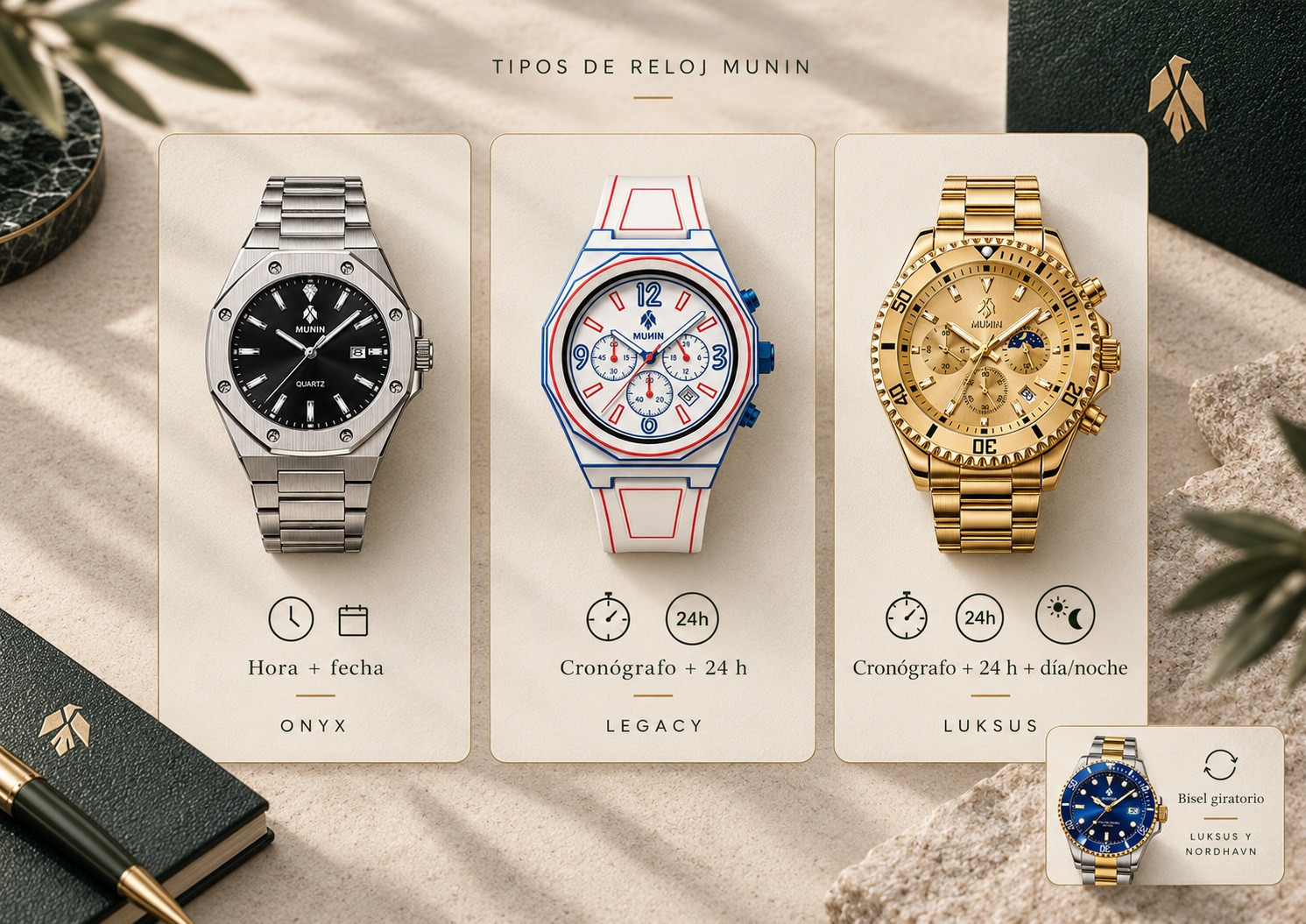
TIME AND DATE
Onyx · Black Onyx · Nordhavn
Three central hands and calendar. No sub-dials.
CHRONOGRAPH + 24 H
Legacy · Toget One
Chronograph and 24-hour indicator.
CHRONOGRAPH + DAY/NIGHT
Midnight Ocean · Heritage · Coppermine · Luksus
24 h indicator with visual sun and moon disc.
Luksus y Nordhavn also feature a 60-minute rotating bezel. See how to use it.
02 / EL CONTROL PRINCIPAL
One crown. Three positions.
The crown is on the right side. Pull it out gently until you feel each stop. You do not need to press or force it.
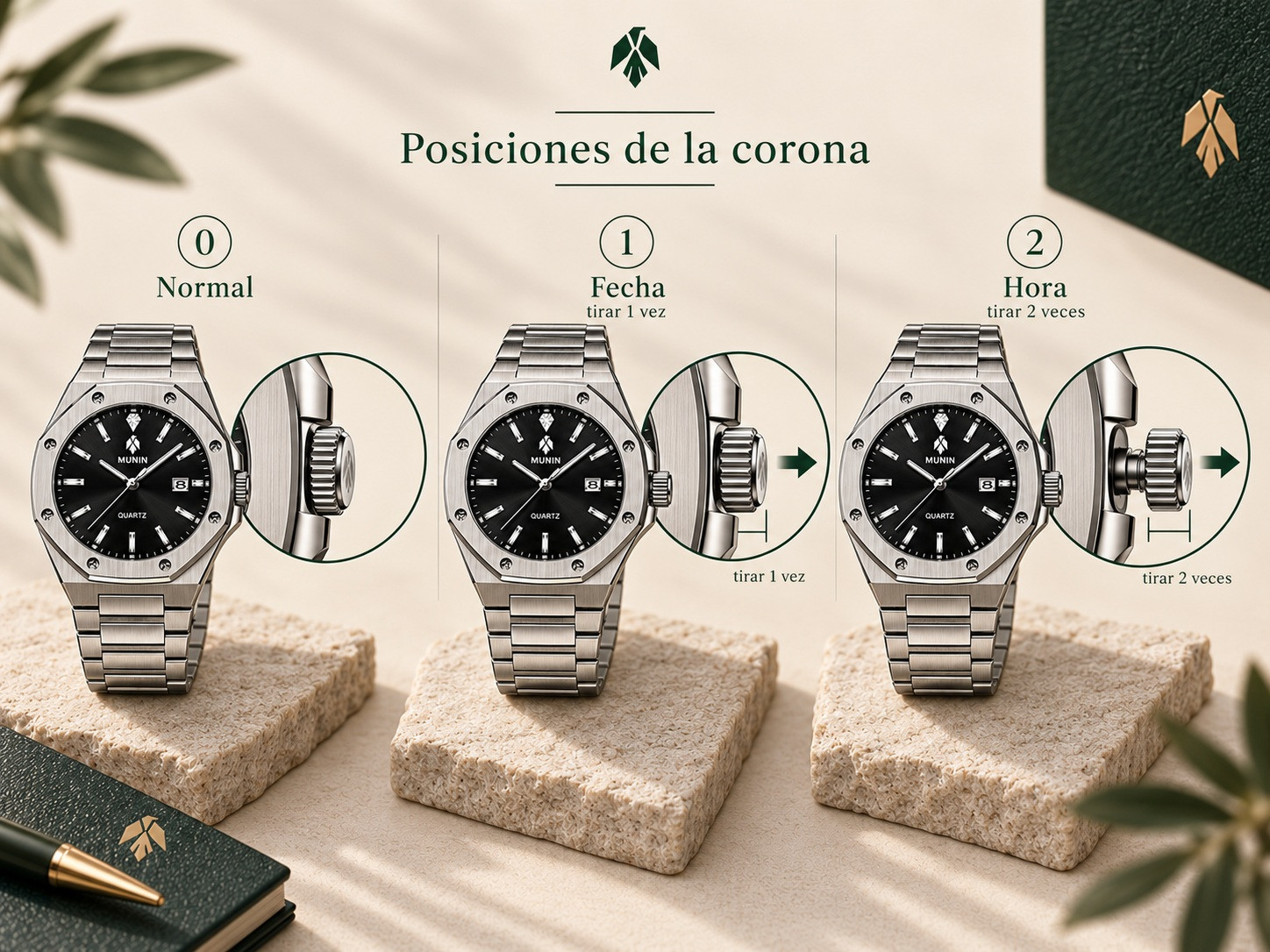
Normal
Crown fully pushed in. This is the usual wearing position.
Date
First notch out. From here you can advance the calendar.
Hora
Second notch, with the crown fully pulled out. Lets you move the hands.
Do not force. If you feel unusual resistance, stop and check that you are in the correct position.
03 / PONER EN HORA
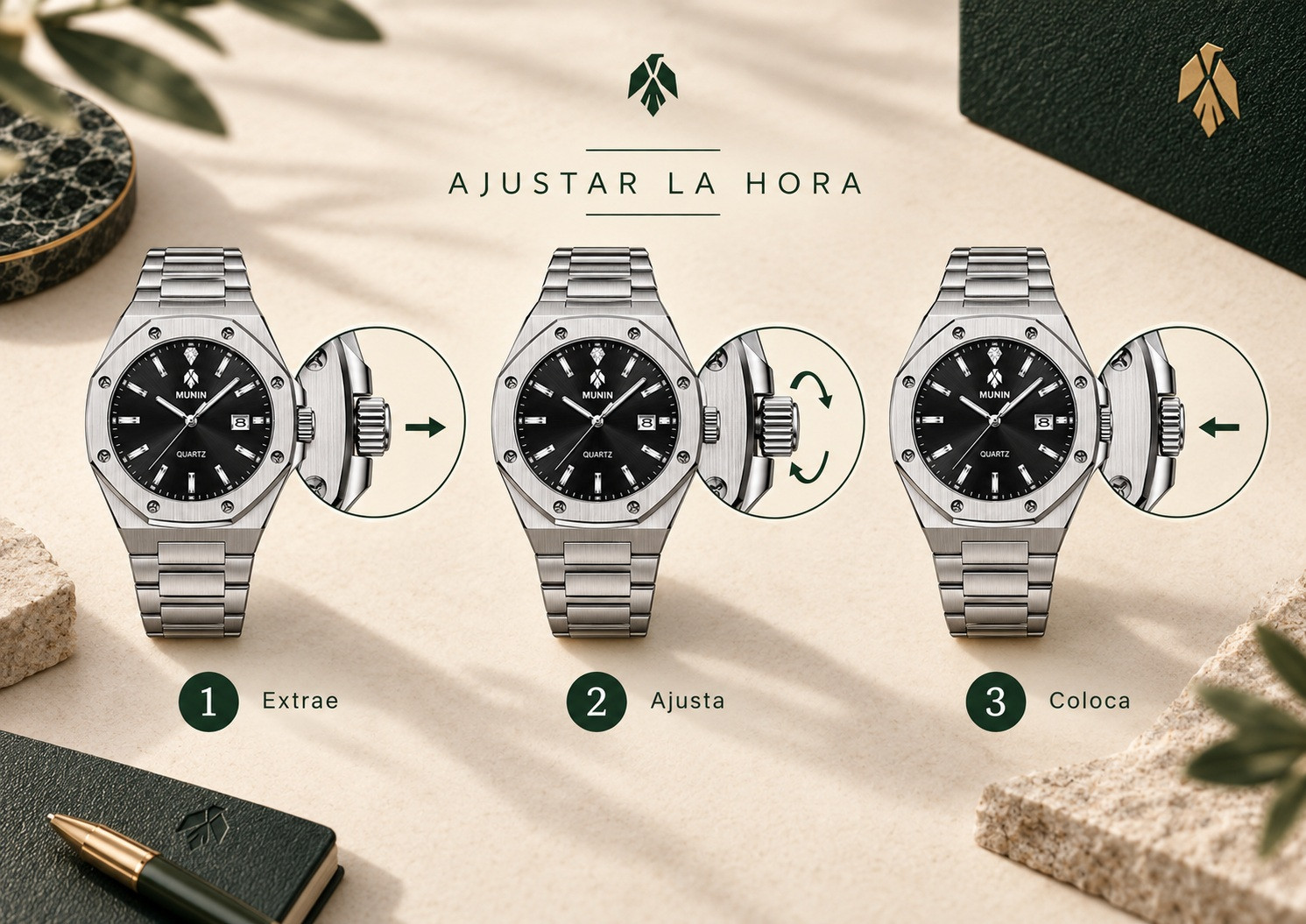
How to adjust the time.
This procedure is the same for all nine MUNIN watches.
Pull to the second position
Tira suavemente hasta llegar al segundo tope.
Gira y selecciona la hora
Move the hands to the desired time. If you will also adjust the date, read the next section first.
Push the crown back in
Presiona suavemente hasta dejarla completamente introducida.
04 / CALENDARIO
How to change the date.
The calendar is adjusted from the first crown position and only moves forward. If you pass the number you wanted, keep turning until it appears again.
Pull one notch
Tira suavemente hasta notar el primer tope.
Advance to the correct day
Turn the crown in the direction that advances the numbers. This adjustment cannot go backward.
Push the crown back in
When the date is correct, push the crown back in fully.
SYNC THE DAY CHANGE
Does it change date at noon?
The watch is synchronized twelve hours off its cycle. Move the crown to the second position and advance the hands another twelve hours.
If you are starting from scratch, select the previous day first and then advance the hands until the calendar jumps to the current day. That jump marks the start of a new day.

05 / CHRONOGRAPH MODELS ONLY
Understand the three sub-dials.
Midnight Ocean, Heritage, Coppermine, Luksus, Legacy, and Toget One share the same functional layout, even if the design differs.

ABAJO
Chronograph seconds. Count the seconds while it is running.
IZQUIERDA
Chronograph minutes. Record the minutes of the measurement.
RESTANTE
Indicador de 24 horas. On four models it also includes the day/night disc.
It is not a moon phase. On Midnight Ocean, Heritage, Coppermine, and Luksus, the sun-and-moon disc represents day and night; it does not show the Moon's astronomical phases.
06 / MIDE EL TIEMPO
How to use the chronograph.
On the six chronograph models, the two pushers next to the crown let you start, stop, and reset a measurement.
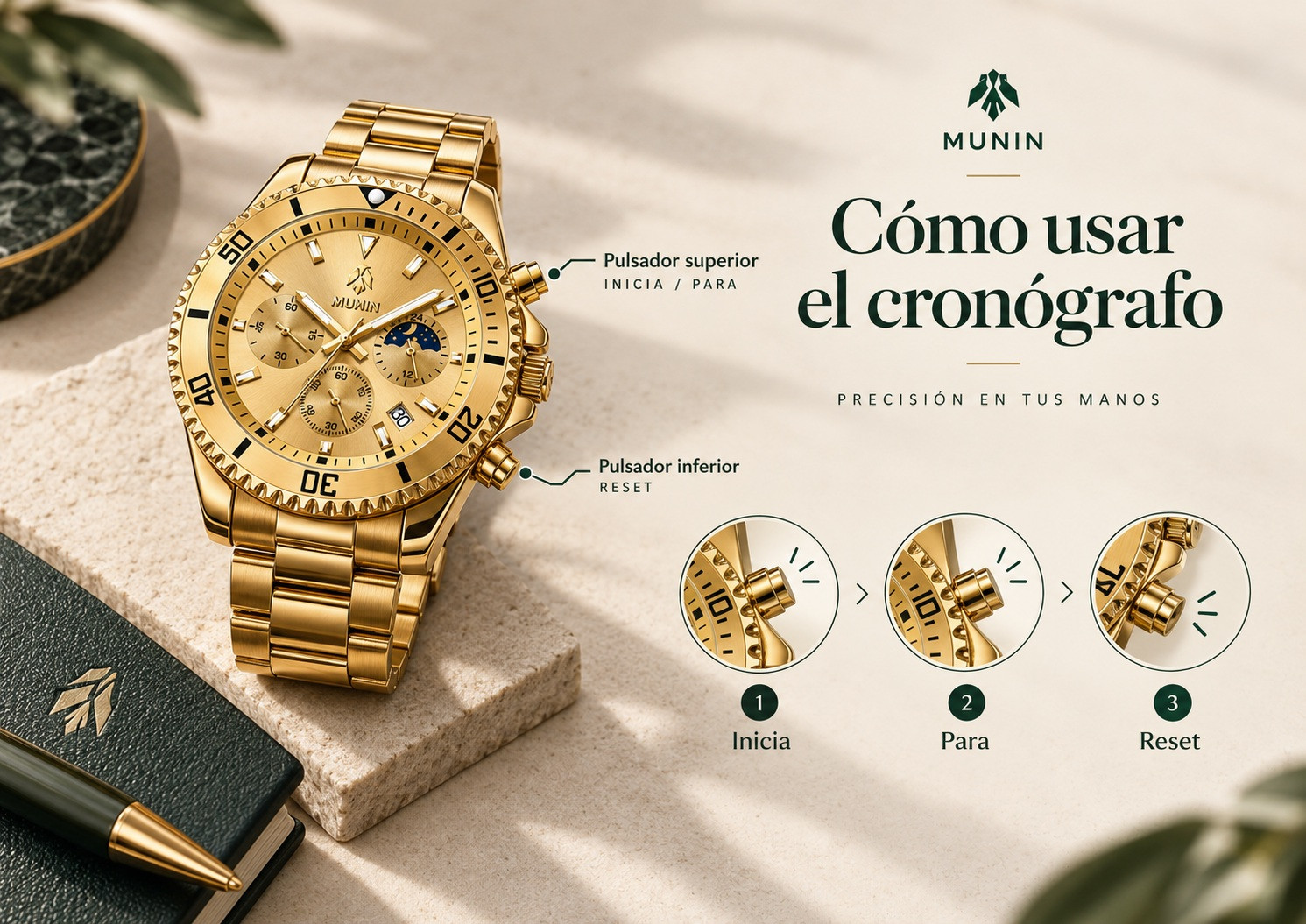
INICIA
Press the top pusher to start.
STOP
Press the top pusher again to stop the measurement.
REINICIA
With the chronograph stopped, use the bottom pusher to return to zero.
The chronograph sub-dial hands are independent of the normal hour and minute reading.
07 / FIX FOR A COMMON ISSUE
Does your chronograph not return to zero?
If the hands remain misaligned after resetting, you can correct their position on the six chronograph models.
Comprueba. Stop and restart the chronograph to see if both hands return to zero.
Crown in position 2. Use the same second notch as for setting the time.
Pulsa RESET. Use the bottom pusher. If you need to advance further, keep it pressed.
Alinea ambas agujas. Each full rotation of the seconds hand advances the minute hand one step.
Finaliza. Push the crown in and try starting, stopping, and resetting again.
Importante: seconds and minutes are not corrected separately. Continue until both align at the same time.
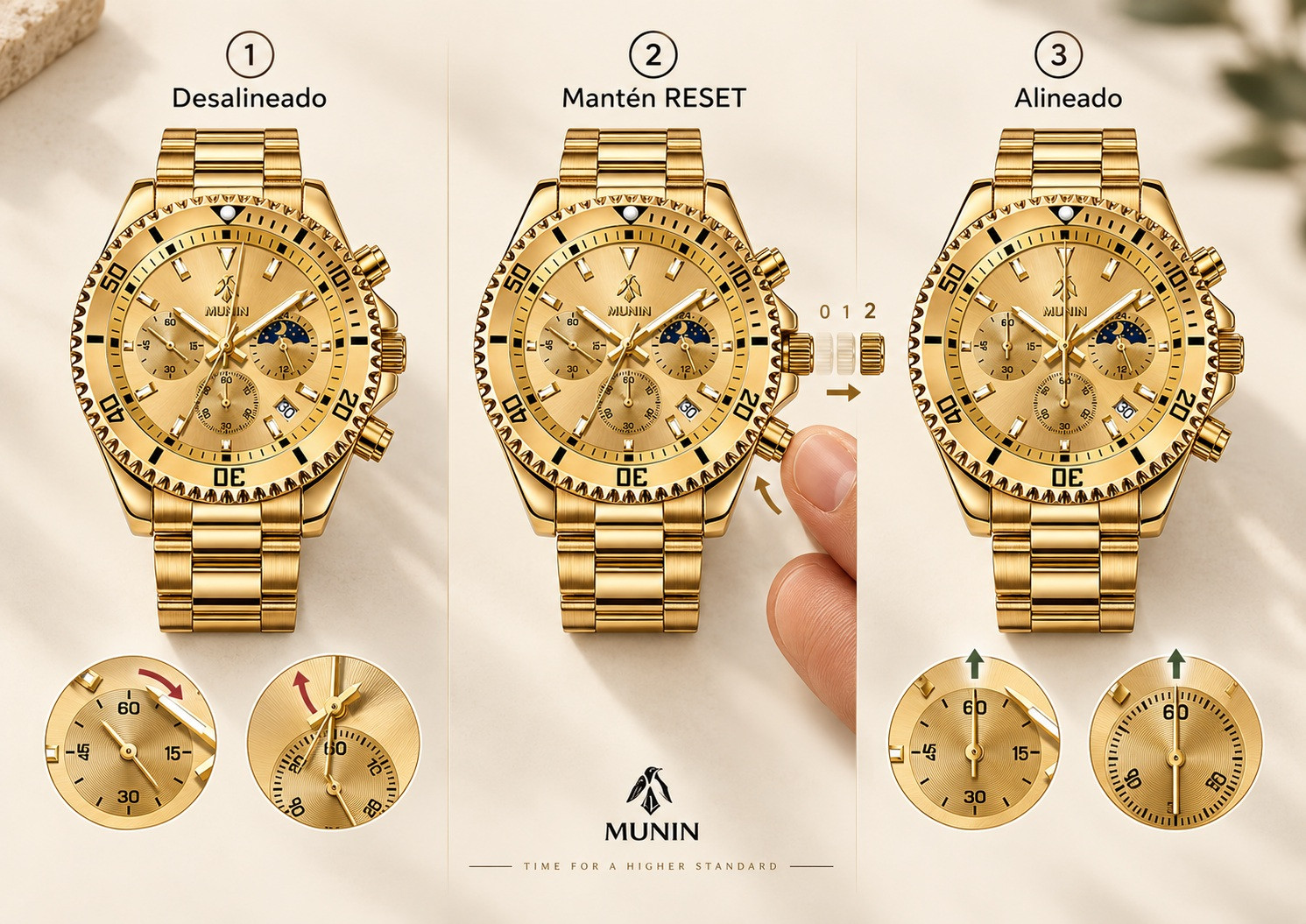
Si no consigues alinearlas: if the behavior is different, you feel resistance, or you cannot return both hands to zero, do not force the mechanism and ask MUNIN for help.
08 / LUKSUS Y NORDHAVN
What the rotating bezel is for.
Luksus and Nordhavn feature a 60-minute unidirectional bezel with a luminous marker. Its origin lies in dive watches, but it can also be used as a visual reference for everyday intervals.
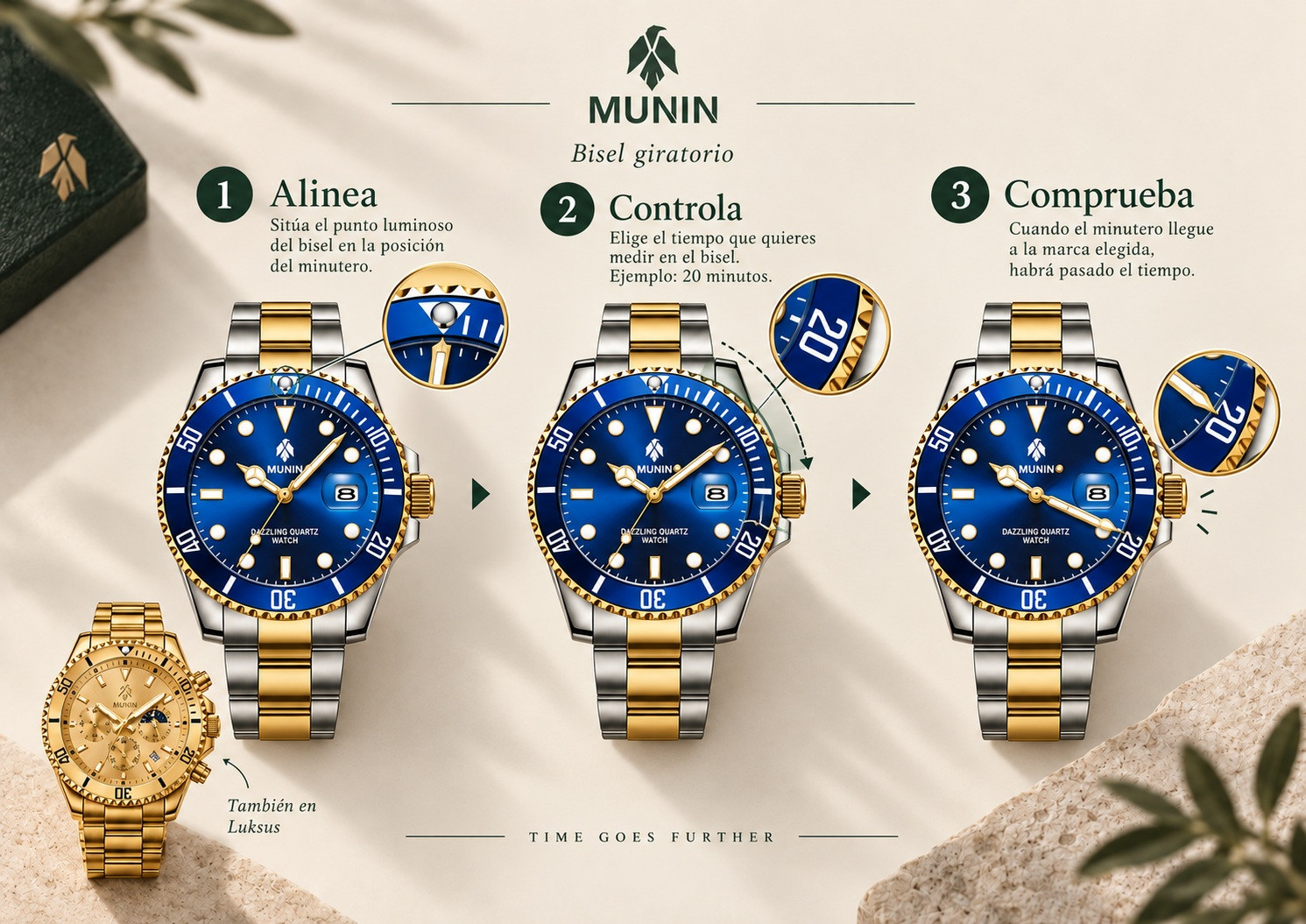
01 · MARCA
Turn the bezel and use the luminous marker as a reference against the minute hand.
02 · CONTROLA
Leave it set while the minute hand advances and use the scale to track the interval.
03 · LEE O USA COMO META
You can read elapsed minutes or place the marker as a future reference and wait for the minute hand to reach it.
Uso y origen. On dive watches, the unidirectional rotation serves a safety function. At MUNIN we present it as a practical way to track minutes in everyday life. Luksus and Nordhavn are not designed for diving, and you should not force the bezel in the opposite direction.
09 / ANTES DE EMPEZAR A LLEVARLO
One last check.
Hora
Check that the hands show the correct time and that AM/PM is properly synchronized.
Date
Check that the calendar shows the current day.
Chronograph
If your model has them, check that the pushers work and return to zero.
Crown
Make sure it is fully pushed in.
PREGUNTAS FRECUENTES
Any questions left?
Should I correct the calendar when the month changes?
It may be necessary. If your watch does not automatically adjust for months with fewer than 31 days, advance the calendar manually to the correct date using the first crown position.
How do I identify my model if I do not remember its name?
Check the product name on your order. If you still have doubts, send MUNIN a front photo of the watch to identify it.
What should I do if I need help after adjusting?
If the date does not advance as described, the crown feels resistant, or a hand does not respond, avoid forcing it and contact MUNIN. A short photo or video will help us understand what is happening.
Can I operate the pushers while the watch is wet?
Avoid it. Do not operate the pushers or crown while the watch is wet or submerged. These models are not designed for diving.
What should I do if the crown or chronograph does not respond as described?
Do not force any part. Check the model and contact the MUNIN team, preferably sending a short photo or video of the behavior.
YOUR MUNIN, READY
Ahora solo queda disfrutarlo.
Once set up, you may also want to adjust the bracelet to your wrist or explore other guides to care for your watch.
- today
- label Watches
- favorite 0 likes
- remove_red_eye 498 views
- comment 0 comments
Comments (0)